Posts

Showing posts with the label google

Download Online Maps and Imagery using QGIS

Image
Needs for High Resolution Imagery is important for many GIS analyst. Sometimes those imagery are coming with not so cheap price. Not many people can have access to those data. But with the recent development of Online Mapping Platform, there are many online map providers gave API services for free to access global level of satellite imagery with no cost, for example Google Earth Pro, Bing, ArcGIS Online, HERE Maps, and many others.  The video below show you a way to get those online high resolution satellite imagery through QGIS Software (that you can also get for free because it is open sourced). Those online basemap and high resolution imagery can be downloaded using QGIS, what you needs to have is just quite fast internet connection.  I am not guarantee that the method shown on the video will always working with QGIS no matter the version, but if you are find some problems with the latest QGIS version, you can always rollback to older version to make this works. Well actual...
Generate Single Mosaic Raster/Map from Map Tiles (Basemap Series Part 6)

Image
This post is designed as continuation from previous Post .  Now if you understand from my previous blog posts, many online map providers publish their online maps as tiled raster/vector map. There also many geospatial data format has been developed to store these tiles. One of them is MBTILES Format. MBTILES stores all tiles into one packed file grouped into its respective zoom levels. Because the tiles structure inside the MBTILES has been standardized, mosaicking those tiles into one single raster dataset is pretty much possible. There are plenty ways to do the mosaicking, one of them is utilizing MOBAC software. You can also use SasPlanet to do this. At my previous post, I show you how to make custom styles of Google Maps using snazzymaps, now I will continue to generate single raster maps of my Area of Interest from the custom google maps. Here is the workflow 1. From my previous post, the endpoint URL of my custom styled Google Maps is shown below. https://ma...

Modify Google Maps Vector Tiles and Open it in QGIS (Basemap Series Part 5)

Image
It is been a while since last time I discuss about vector tiles basemap. And today I found something cool that may be useful for you too. As you already know, Google nowadays is also publish it online maps to vector tiles format which make their maps more beauty as well as faster to load. And because vector tiles based online maps can be stylized in a custom way, there goes also the google maps vector tiles. You can modify how it looks to suit your application needs without spending additional money or resources. Now, lets go to how to do that. 1. First, go to application that enabling us to customize the Google Maps style using CSS.  https://snazzymaps.com is one example. You can explore styles made by other people or make a new style for yourself if you have enough knowledge about CSS. 2. After you find certain style that you are interested in, go to inspect element (chrome) or Firebird (Firefox) and find out the URL for a tile image. Below is an example. https:/...

Survei dan Pemetaan Menggunakan GPS dan GIS (Ebook)

Image
Saya baru mempublish salah satu kumpulan tutorial (lama tapi) baru tentang pengolahan gps di dalam GIS di GPlay Books, dengan harga yang (semoga) cukup murah, Hasil penjualan insya Allah sebagian besar digunakan untuk membeli kopi agar otak bisa memproduksi buku2 tutorial lain di masa mendatang, Terimakasih, Link Buku di Google Play Books di sini https://play.google.com/store/books/details?id=wILvDAAAQBAJ

Adding Online Map Services in Global Mapper

Image
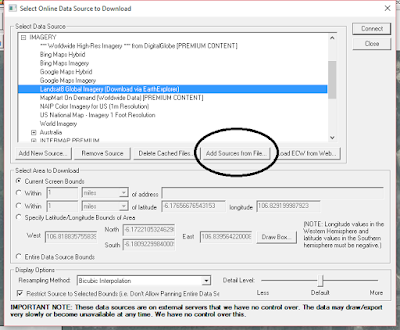
Actually, we could display online map services into global mapper and further leverage the software capabilities to deal with certain tasks. This can be achieved using protocol similar to what we do in SASPlanet, i.e creating an xml file which contain the URL and tags, import it to global mappers's online data sources and just go mapping. Start by copy the code below in an XML file <source_list creator= "Global Mapper - http://www.globalmapper.com" version= "1.0" xmlns:xsi= "http://www.w3.org/2001/XMLSchema-instance" xmlns= "http://www.globalmapper.com/OSL/1/0" xsi:schemalocation= "http://www.globalmapper.com/OSL/1/0 http://www.globalmapper.com/OSL/1/0/gmc.xsd" > <source type= "GMAP" ></source> <name> Bing Maps Hybrid </name> <group_list> <group> &lt;![CDATA[*** POPULAR SOURCES ***]]&gt; </group> <group> IMAGERY ...

Add Online Basemap Services to ArcMap Using Portable Basemap Server

Image
Just found a nice tutorial about converting online basemap services into ArcGIS ArcMap

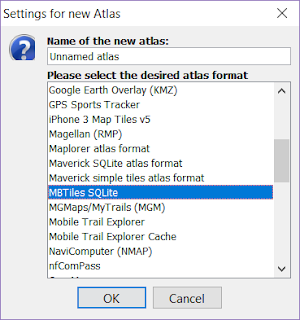
Membuat Offline Map di Aplikasi OruxMaps (Android) menggunakan Mobile Atlas Creator

Image
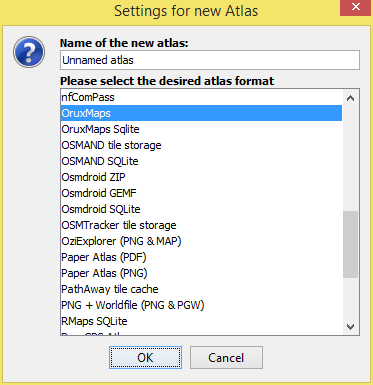
Navigasi dan survey GPS menggunakan Handphone memang praktis, tapi jika peta yang digunakan sebagai referensi merupakan peta online, kita akan berhadapan dengan beberapa masalah, yang pertama perlu alokasi pulsa yg cukup untuk mengunduh peta online melalui paket data, baterai yang menjadi lebih cepat habis karena mengakses jaringan 3G, dan coverage jaringan internet seluler yang tidak selalu baik di setiap tempat. Dengan menggunakan Mobile Atlas Creator, kita dapat membuat offline Map yang nanti dapat dibuka di HP android dan dijadikan sebagai basemap kegiatan navigasi atau survei yang kita lakukan. Dengan demikian kita tidak perlu khawatir mengenai paket data dan baterai yg cepat habis.  MOBAC dapat diunduh dari situs INI   Di situs itu juga dijabarkan aplikasi aplikasi mobile yang didukung oleh software tersebut. MOBAC memerlukan Java Runtime, oleh karena itu sebelum menggunakan MOBAC pastikan JRE versi terbaru sudah terinstal MOBAC bersifat portable/executa...

Koreksi Diferensial GPS Praktis di Handphone Android Menggunakan Aplikasi Mobile Topographer

Image
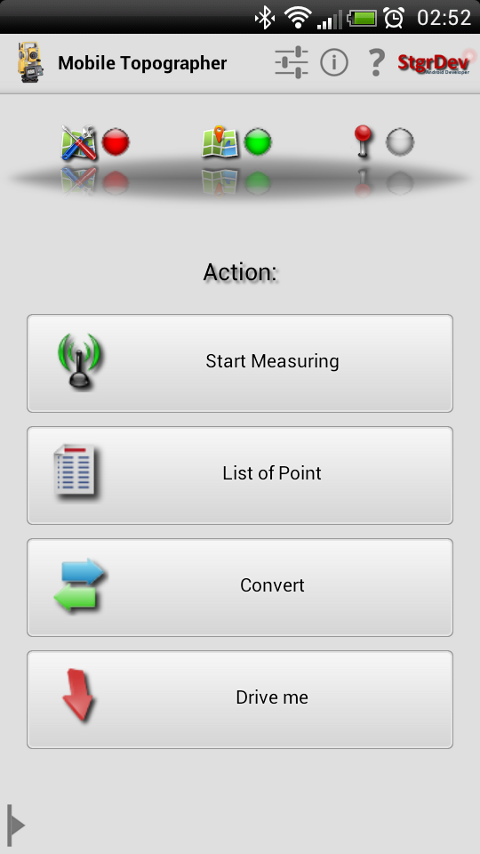
Koreksi Diferensial adalah teknik untuk meningkatkan akurasi pengamatan posisi GPS/GNSS dengan cara membandingkan hasil pengukuran dari dua receiver GPS atau lebih. Ilustrasi tentang koreksi diferensial dan manfaatnya dapat dilihat dari link INI . Koreksi diferensial dapat dilakukan secara otomatis secara real time (saat pengukuran di lapangan) atau post processing (koreksi pasca lapangan di komputer). Koreksi diferensial dapat dilakukan secara manual/praktis atau otomatis menggunakan software, yang penting pengamatan koordinat pada lokasi yang diukur dan lokasi referensi dilakukan pada waktu yang sama persis. Umumnya dukungan koreksi diferensial yang "robust" hanya tersedia pada perangkat receiver/antenna yang mendukung code dan atau carrier phase (receiver kelas mapping sampai geodetic), sementara untuk perangkat GPS handheld/navigasi, proses ini agak sulit untuk dilakukan secara presisi. Walaupun demikian, sebagaimana pengembangan teknik dan alat pengukuran GPS untuk...

Mengekstrak data vektor GIS dari google maps menggunakan ArcScan

Image
Sebenarnya ini tidak dibenarkan, tapi barangkali dapat bermanfaat dalam kondisi sangat terpaksa, dimana tidak ada peta dasar yang layak untuk wilayah kajian, tidak ada data free (misalnya open street map) di area kajian, dan tidak ada dana untuk pengadaan peta dasar (permasalahan klasik di Indonesia). Selain itu, ini sebenarnya juga (mungkin) melanggar Term Of Service/Use dari Google Map, dan juga melanggar UU No 4 Tahun 2011 dan PP turunannya terkait penggunaan peta dasar. Trik ini menggunakan ArcScan, sebuah ekstensi untuk konversi raster data ke vektor data di ArcGIS. Berikut ini step-nya 1. Download Data raster google maps wilayah kajian yang sudah tergeoreferensi/mempunyai world file/projection file (tfw,jgw,bmpw,pgw,prj). Silahkan cari tahu caranya di internet. 2. Buka data raster google maps di ArcMap secara terpisah per band (rgb)-nya. 3. Perhatikan baik - baik kenampakan yang akan ekstrak pada masing-masing band, pastikan nilai pikselnya berbeda dengan obyek lain. Ha...